Server Time Synchronization Guide
Accurate timekeeping underpins modern civilization — from financial transactions to air traffic control, even tiny discrepancies in time can have serious consequences. This guide explains the science behind time standards, how atomic clocks work, how your computer stays synchronized through NTP, and why precise server time matters in critical industries. Understanding time synchronization helps you appreciate just how complex it is to answer the simple question: what time is it?
Time Standards: UTC, TAI, and GPS Time
UTC, TAI, GPS Time and local civil time serve different purposes. TAI (International Atomic Time) is a continuous atomic time scale computed by BIPM from contributing clocks; it does not add leap seconds. UTC (Coordinated Universal Time) differs from TAI by an integer number of seconds and is the international reference for civil time zones. GPS Time was aligned with UTC at its start in 1980 but does not add leap seconds.
According to the U.S. Naval Observatory, as of September 2026 TAI is 37 seconds and GPS Time is 18 seconds ahead of UTC. These offsets can change under future leap-second policy.
| Time scale | Leap seconds | Basis and use |
|---|---|---|
| TAI | Not applied | Continuous atomic time scale |
| UTC | Applied under current rules | International reference time |
| GPS Time | Not applied | Satellite navigation time scale |
| KST | Follows UTC | Korea Standard Time, UTC+9 |
Atomic Clocks and the Definition of a Second
The BIPM definition of the SI second fixes the unperturbed ground-state hyperfine transition frequency of caesium-133 at 9,192,631,770 Hz. Caesium clocks use this atomic transition as a frequency reference.
Primary standards and newer optical clocks have different measured uncertainties; a single “one second in N years” number cannot describe every device. National metrology institutes compare their standards and contribute to international time scales. Distribution of those standards through NTP is a separate process from Clock-Tani's browser display, which does not connect directly to an atomic clock.
NTP: How Your Computer Stays in Sync
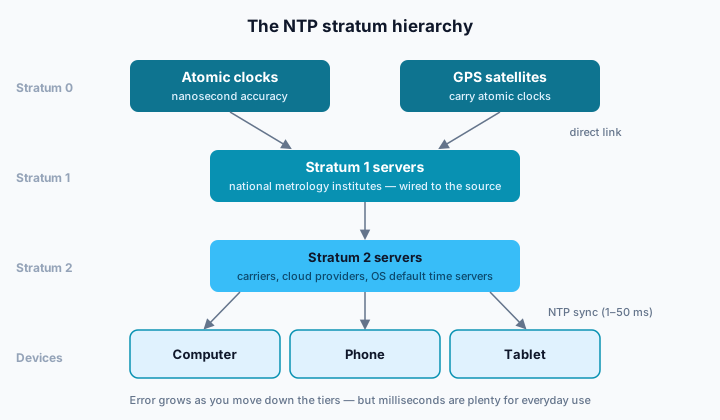
The Network Time Protocol (NTP) synchronizes computer clocks over networks. RFC 5905 (NTPv4) describes a hierarchy of time servers and an offset calculation using four timestamps: client send and receive times, and server receive and transmit times. A client can use these observations to discipline its system clock.
Performance depends on the server's reference, the device clock, network delay and asymmetry. Fast local-network examples in the RFC are not a fixed accuracy promise for the public internet or every operating system. NIST's Internet Time Service notes that the accuracy seen by a user depends largely on network stability and reciprocity.
Clock-Tani does not run NTP in the browser or adjust the device clock. Its server-time page estimates a difference from web API responses and round-trip timing.
Crystal Oscillator Drift in Computers
Computer and phone clocks depend on hardware oscillators and operating-system timekeeping. Oscillator frequency can vary with temperature, age and device design, but no single frequency, daily drift rate or synchronization interval applies to every computer.
Many operating systems can periodically adjust their clock using a network time service when enabled and connected. The method and schedule depend on settings and the device. If an offset seems unexpected, check automatic time and time-zone settings; treat a browser comparison as an estimate affected by the network. NIST's timekeeping FAQ illustrates how quartz-clock errors depend on the oscillator.
Implementation Note: Three Samples and the Middle-Latency Result
The default server-time page makes three requests to Clock-Tani's API. For each response it adds half of the browser-measured round-trip time to the API's Date.now() timestamp, then selects the sample with the middle latency. This reduces one slow outlier's influence; it is not NTP synchronization or an accuracy certification. Returning to the page or network reconnection can trigger another measurement.
For a site-specific view, the server makes one HEAD request to the target when a recent result is not already cached; a valid estimated offset can be reused for up to 60 seconds. It consults the target's HTTP Date header and round-trip time, then separately measures the API hop to the browser. HTTP-date has one-second resolution. Missing or unreliable headers can lead to another source or device time, which the interface distinguishes. Half-RTT correction assumes similar outbound and return delays and cannot guarantee a fixed precision.
Leap Seconds: Bridging Atomic and Astronomical Time
Under current UTC rules, leap seconds are used when needed to keep UTC close to Earth-rotation time (UT1). The IERS Bulletin C announces whether a leap second will be introduced. A positive leap second can insert 23:59:60 after 23:59:59 in UTC, which requires software to handle an unusual minute.
CGPM Resolution 4 (2022) calls for increasing the permitted UT1–UTC difference by or before 2035 and preparing an implementation plan for a more continuous UTC. It does not specify an already-final post-2035 adjustment method or make a blanket promise that all leap-second handling ends on a particular date.
Industries That Demand Precise Time
Financial markets, aviation and navigation systems, telecom networks and power grids all use timing, but their required precision and validation methods differ by application. For example, EU Delegated Regulation 2025/1155 on high-frequency algorithmic trading activity specify a 100-microsecond maximum UTC divergence for a particular activity; that is not a universal rule for all trades or industries.
Satellite navigation, base-station coordination and grid measurements have their own timing requirements. A browser view based on web responses, such as Clock-Tani, is not a validated clock for those systems. Use the relevant system's official time source and records for consequential decisions.
A Five-Minute Check: How Far Off Is Your Clock?
Open the server-time page to compare your device clock with a web-response-based Clock-Tani estimate. The default view already takes three API samples and chooses the middle-latency result; refreshing three times does not turn those offsets into a certified “real” device error.
The page shows an estimated millisecond offset, not a measured round-trip-delay value or a diagnosis of your operating system's NTP state. Use “Sync again” after a connection change if you want another estimate. If a persistent difference seems unexpected, check your device's automatic time and time-zone settings. There is no universal normal/caution/serious threshold for this browser measurement, and a reboot is not a general prerequisite before a time-sensitive event.
Using Clock-Tani's Server Time Tool
Clock-Tani's server-time page displays a web-response-based reference beside device time and estimates their difference. The default source is Clock-Tani's own API timestamp; a site-specific view may use the target's HTTP Date header or a clearly indicated fallback.
This comparison cannot establish whether your computer's NTP service is working, certify an absolute error, or verify a ticket seller's internal opening time. Network delay and server-clock error can affect it. For sales, exams and other consequential deadlines, rely on the organizer's official announcements and submission records. The tool can help you observe and recheck a reference, and it can count down to a time you set.
Conclusion
Time synchronization relies on atomic standards, clock hardware, network protocols and careful measurement. Clock-Tani offers a web-response-based estimate for comparing your device with a reference; it neither sets the device clock nor certifies its absolute accuracy. For consequential deadlines, follow the responsible organization’s official time and records.